# Unreal Engine Interaction SDK

## 1. Basic Introduction

### 1.1. Environmental Requirements

* This SDK needs to be used with UnrealEngine 5.0 or above, as well as HandDriver gloves.

### 1.2. File Download

* **SDK download address:**
* **Release date:**

### 1.3. Feature Introduction

The UnrealEngine Interaction SDK is a Software Development Kit designed for developers to enhance the hand interaction experience in Unreal Engine with gloves. This SDK includes two core components: UdxHandControl(interaction component) and UdGrab(grip component). In addition, the SDK also provides a static class UdeInteractionFuncLib for providing auxiliary features and static methods.

## 2. Development Readiness

### 2.1. Check the File

Check if there is a HandDriver plugin and make sure the project project supports UDEXREAL HandDriver UE5 SDK streaming. If it is not supported yet, please check the [UDEXREAL HandDriver UE5 Plugin Tutorial](https://udexreal.gitbook.io/udexreal-docs/plugins/instructions-for-using-plugins/ue5-plugin-tutorial) and configure the streaming environment according to the documentation.

### 2.2. Plugin Installation

#### 2.2.1. Import Plugin

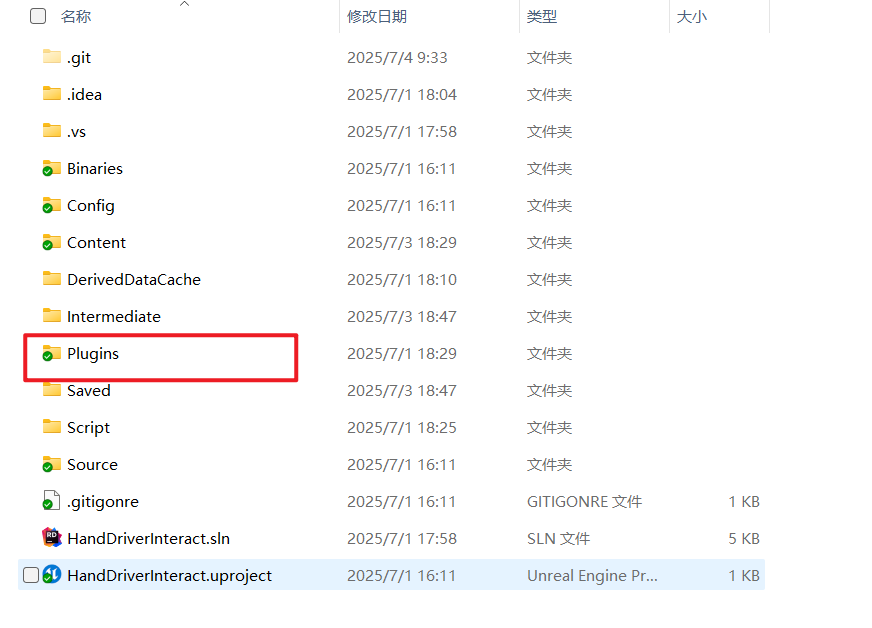
Unpack the plugin from Compressed Packet and drag it to the Plugins directory of the project project (if there is no Plugins folder, you need to manually create one with the same name).

<figure><img src="https://2082502898-files.gitbook.io/~/files/v0/b/gitbook-x-prod.appspot.com/o/spaces%2F8s1Ia6TfFovgyJ5JsDJZ%2Fuploads%2FVOpIOUL5IXEBbcxSv9tN%2Fimage.png?alt=media&#x26;token=a77165c2-094c-4bdd-b8c6-99c644d0d9af" alt="" width="563"><figcaption></figcaption></figure>

#### 2.2.2. Enable Plugin

If not enabled, please enable the plugin first. If already enabled, please skip this step.

<figure><img src="https://2082502898-files.gitbook.io/~/files/v0/b/gitbook-x-prod.appspot.com/o/spaces%2F8s1Ia6TfFovgyJ5JsDJZ%2Fuploads%2FWFKvpa3u3zWekwJ4rg3M%2Fimage.png?alt=media&#x26;token=99ec8cc1-7ae7-4c16-93cd-094cd4407fc0" alt="" width="563"><figcaption></figcaption></figure>

## 3. Quick Start

### 3.1. Add Components

#### 3.1.1. Pawn Interactive Component

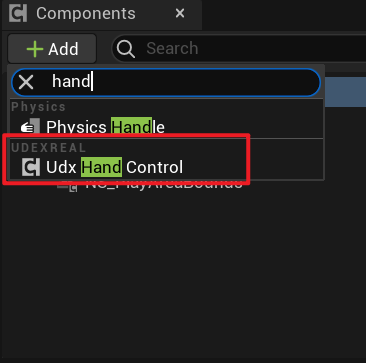
* **Add interactive Components**

Add interactive components to pawn and use them together with crawling components. Two components are needed here, one for the left hand and one for the right hand, to be added according to actual needs.

{% columns %}
{% column %}

<figure><img src="https://2082502898-files.gitbook.io/~/files/v0/b/gitbook-x-prod.appspot.com/o/spaces%2F8s1Ia6TfFovgyJ5JsDJZ%2Fuploads%2FH7f65y2NLCfv15LLTKrn%2Fimage.png?alt=media&#x26;token=0141548c-a981-498c-bcf0-ae8f9eefae66" alt=""><figcaption></figcaption></figure>
{% endcolumn %}

{% column %}

<figure><img src="https://2082502898-files.gitbook.io/~/files/v0/b/gitbook-x-prod.appspot.com/o/spaces%2F8s1Ia6TfFovgyJ5JsDJZ%2Fuploads%2F9crkKtSjnTpQMlN6gvSI%2Fimage.png?alt=media&#x26;token=a5216106-8efd-486b-ab2e-4597a05a442c" alt=""><figcaption></figcaption></figure>
{% endcolumn %}
{% endcolumns %}

* **Interaction Component Settings**

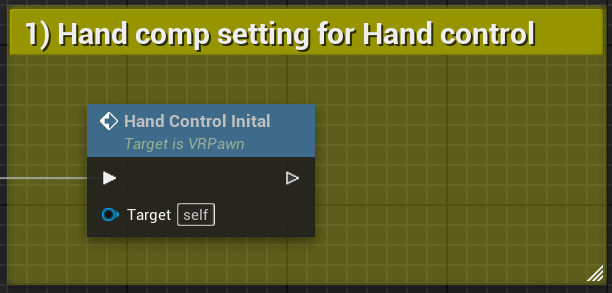
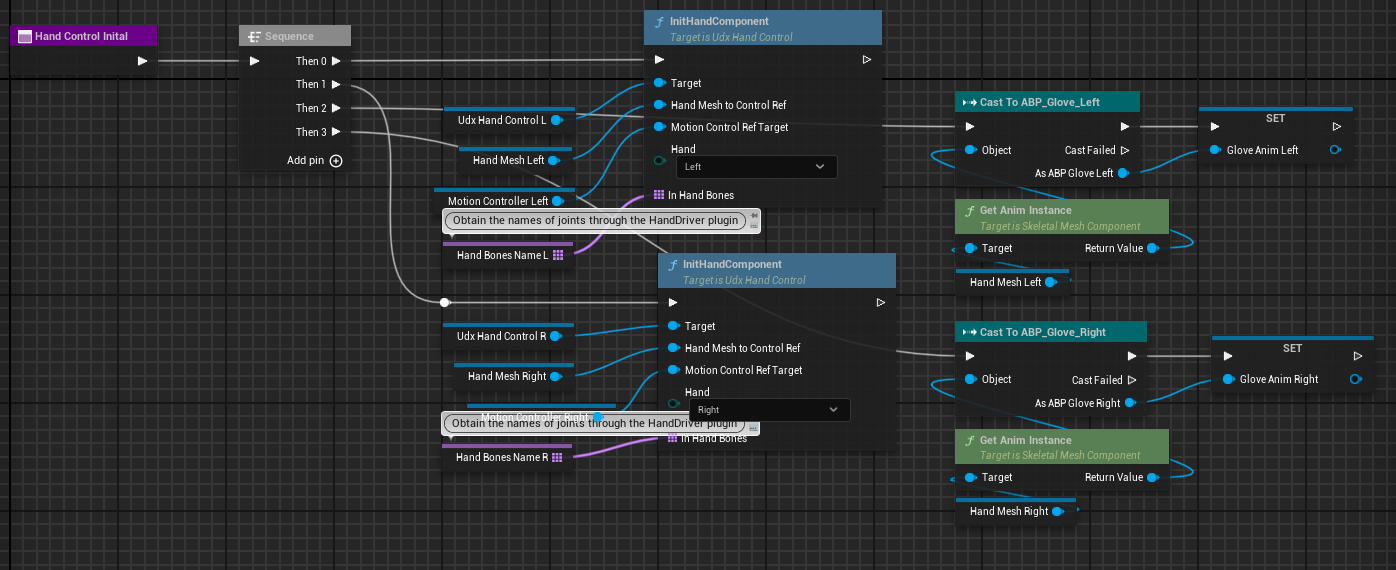
1️⃣Init interaction components.

{% columns %}
{% column %}

<figure><img src="https://2082502898-files.gitbook.io/~/files/v0/b/gitbook-x-prod.appspot.com/o/spaces%2F8s1Ia6TfFovgyJ5JsDJZ%2Fuploads%2FFzFx0qBBfNdDCmlHsQ5g%2Fimage.png?alt=media&#x26;token=4bab4f84-4399-4b32-adb0-3980e032c45a" alt=""><figcaption></figcaption></figure>
{% endcolumn %}

{% column %}

<figure><img src="https://2082502898-files.gitbook.io/~/files/v0/b/gitbook-x-prod.appspot.com/o/spaces%2F8s1Ia6TfFovgyJ5JsDJZ%2Fuploads%2F3wZolhRtg5eyWhU2yugg%2Fimage.png?alt=media&#x26;token=568ca0df-54f2-445d-9804-ba4dcb180fda" alt=""><figcaption></figcaption></figure>
{% endcolumn %}
{% endcolumns %}

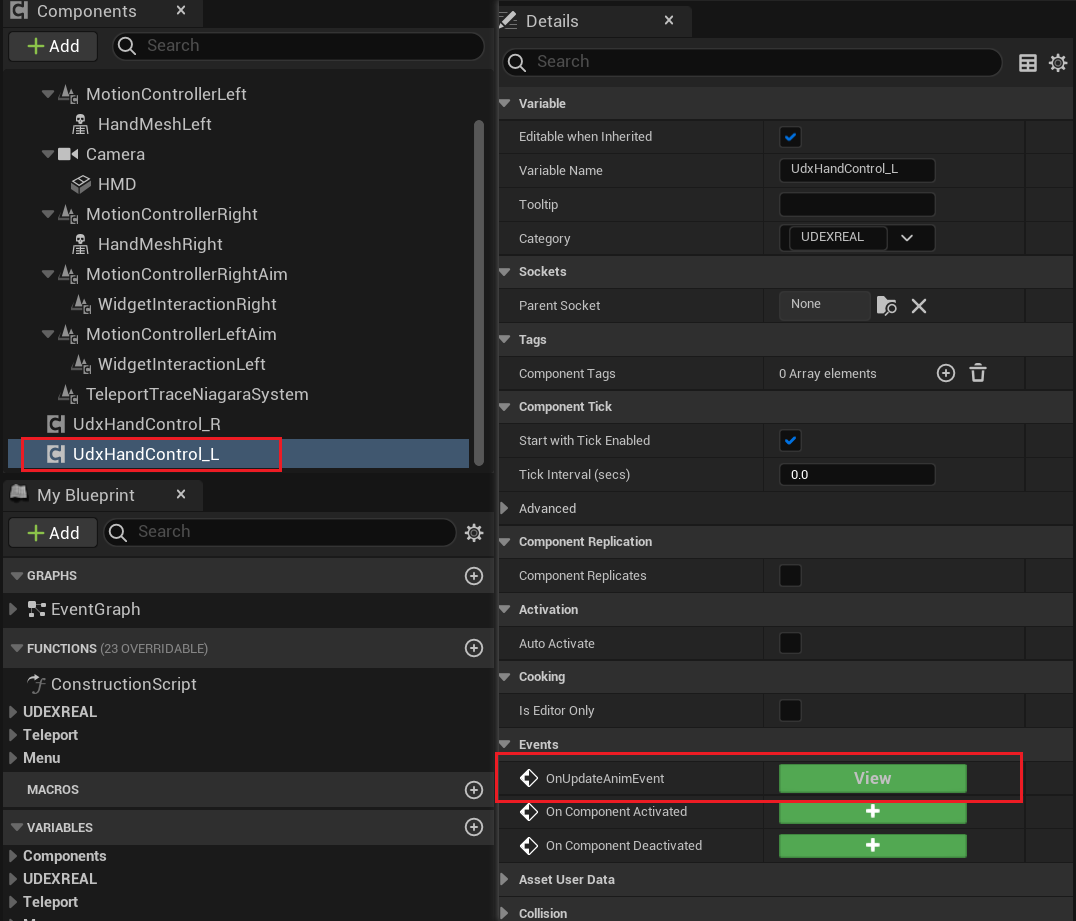
2️⃣Add update Anim Event

<figure><img src="https://2082502898-files.gitbook.io/~/files/v0/b/gitbook-x-prod.appspot.com/o/spaces%2F8s1Ia6TfFovgyJ5JsDJZ%2Fuploads%2F8sswI4PmQytQCLzxKiQH%2Fimage.png?alt=media&#x26;token=89c4cd2b-9e98-4279-8a5a-c020dec356bd" alt="" width="563"><figcaption></figcaption></figure>

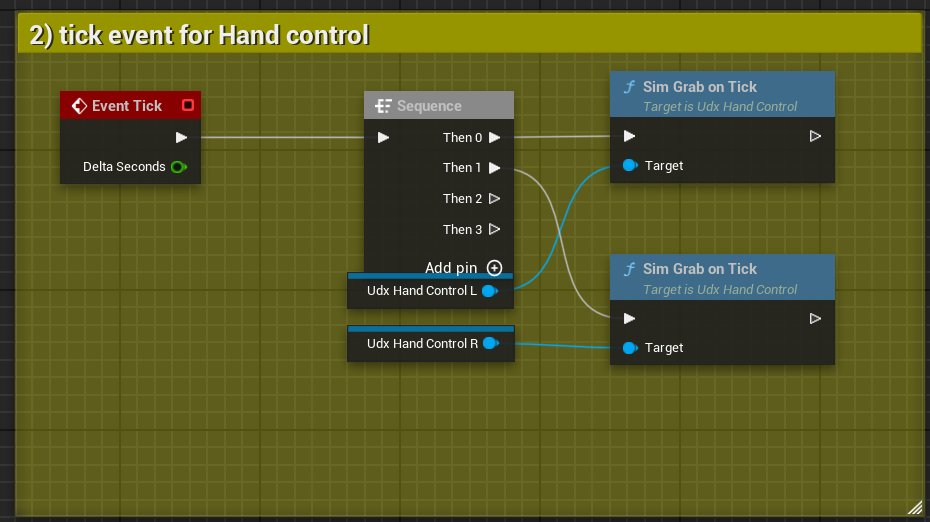
3️⃣Add SimGrabOnTick func

<figure><img src="https://2082502898-files.gitbook.io/~/files/v0/b/gitbook-x-prod.appspot.com/o/spaces%2F8s1Ia6TfFovgyJ5JsDJZ%2Fuploads%2FSqlSClW1zJhndkih2fxC%2Fimage.png?alt=media&#x26;token=9249b3d9-60ba-4b0f-ac07-cd5d51d20ed6" alt="" width="563"><figcaption></figcaption></figure>

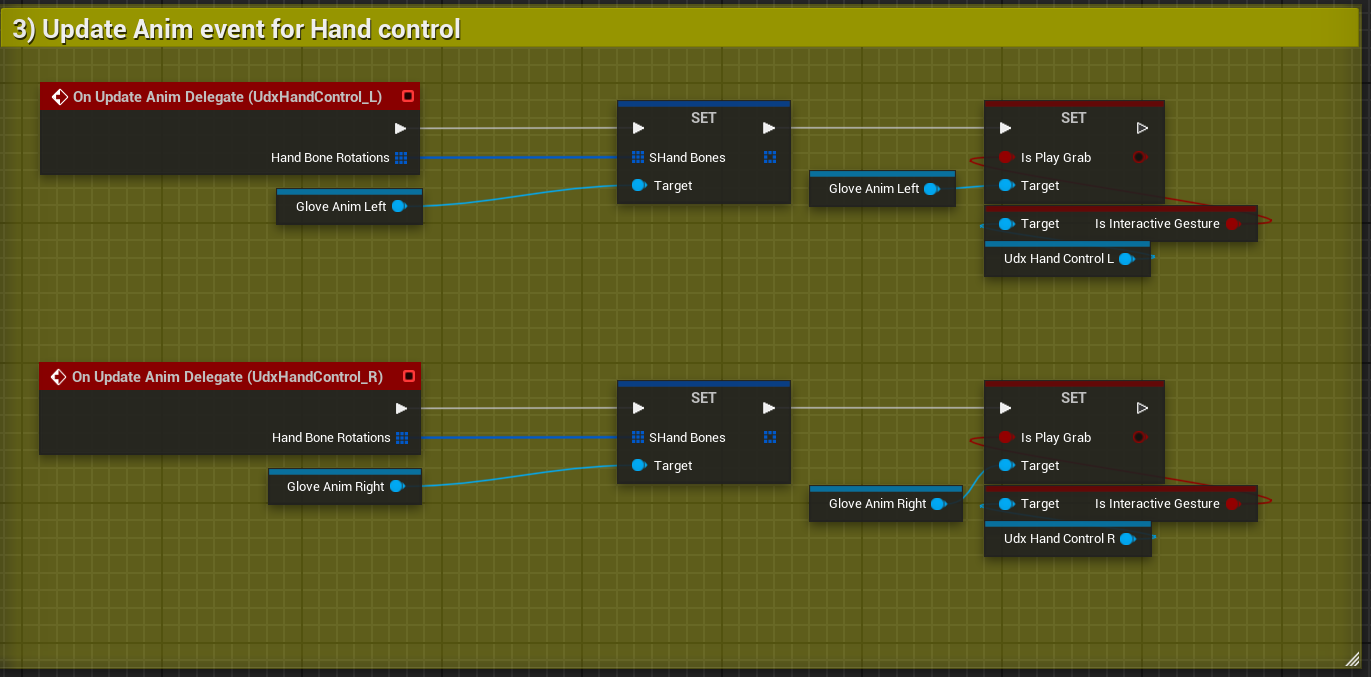
4️⃣Update Anim for hand

<figure><img src="https://2082502898-files.gitbook.io/~/files/v0/b/gitbook-x-prod.appspot.com/o/spaces%2F8s1Ia6TfFovgyJ5JsDJZ%2Fuploads%2FywV7kV3iZTOL697piwlP%2Fimage.png?alt=media&#x26;token=69eb0a1b-38a8-43f2-9296-bb84b8547bf3" alt="" width="563"><figcaption></figcaption></figure>

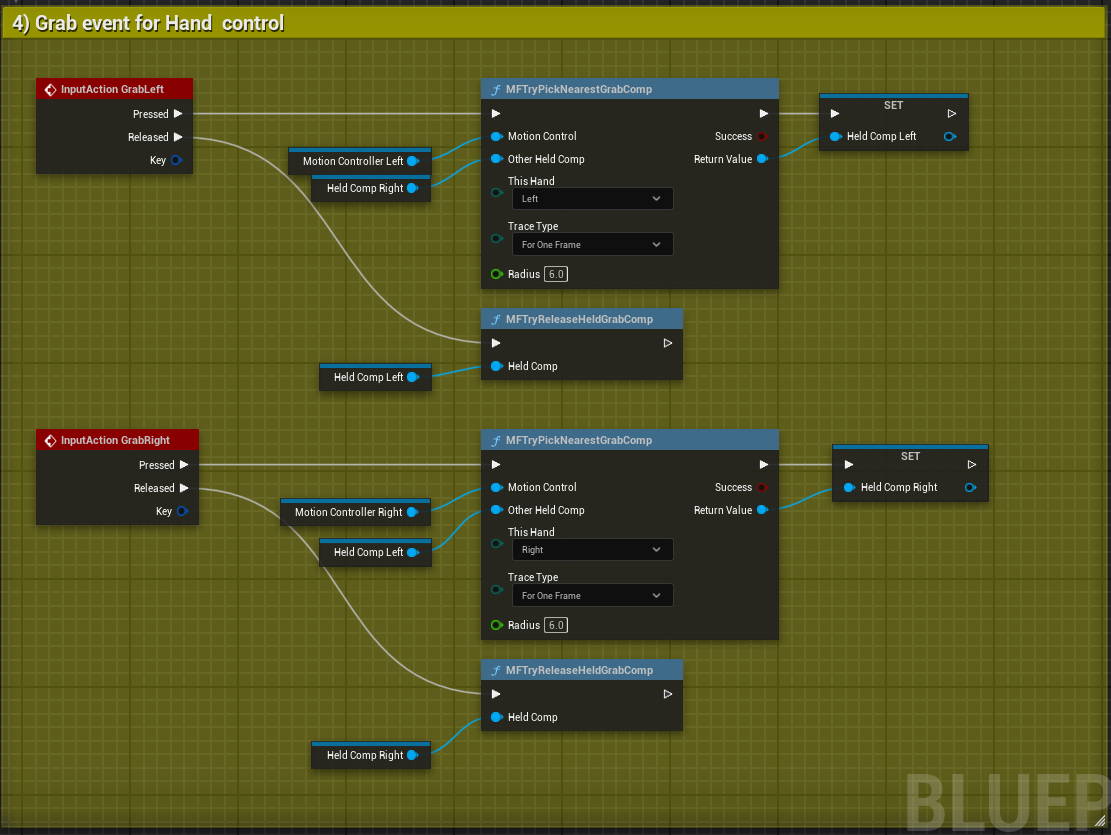
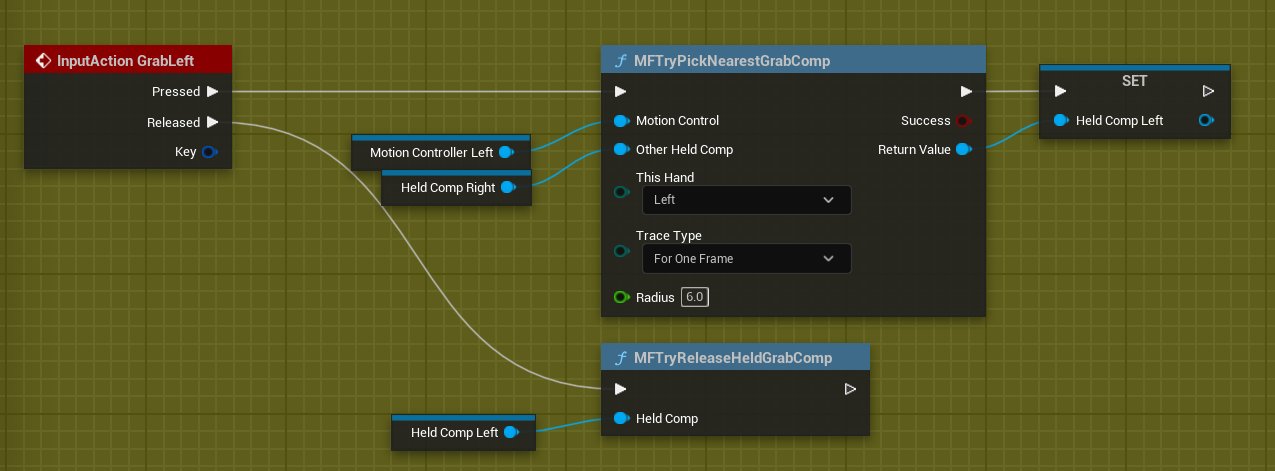
5️⃣Add Grab/Release func

<table><thead><tr><th width="152" align="center">Name</th><th align="center">Type</th><th width="131" align="center">Defult</th><th align="center">Explain</th></tr></thead><tbody><tr><td align="center">MotionControl</td><td align="center">USeceneComponent</td><td align="center">nullptr</td><td align="center">The MotionControllerComponent of the controlled object</td></tr><tr><td align="center">OtherHandComp</td><td align="center">UdxGrabComponent</td><td align="center">nullptr</td><td align="center">The UdxGrabComponent obtained by the other hand</td></tr><tr><td align="center">ThisHand</td><td align="center">Enum</td><td align="center">Left</td><td align="center">Trigger the interaction of the left hand</td></tr><tr><td align="center">TraceType</td><td align="center">Enum</td><td align="center">ForOneFrame</td><td align="center">Display one frame of the detected sphere</td></tr><tr><td align="center">Radius</td><td align="center">float</td><td align="center">6.0</td><td align="center">Measure the radius of the sphere</td></tr><tr><td align="center">ReturnValue</td><td align="center">UdxGrabComponent</td><td align="center">nullptr</td><td align="center">Return the UdxGrabComponent obtained by the current hand.</td></tr></tbody></table>

<figure><img src="https://2082502898-files.gitbook.io/~/files/v0/b/gitbook-x-prod.appspot.com/o/spaces%2F8s1Ia6TfFovgyJ5JsDJZ%2Fuploads%2FvgWrHAsw1BLGLO2PJiTd%2Fimage.png?alt=media&#x26;token=00e25348-8b99-48b0-900d-b4eb80e51678" alt="" width="563"><figcaption></figcaption></figure>

#### 3.1.2. Add Anim Blueprint

* Create an anim blueprint. If it has already been created, proceed to the next step directly.
  * **Create Details:** omitted
* Ceate variables **bool** bIsPlayGrab
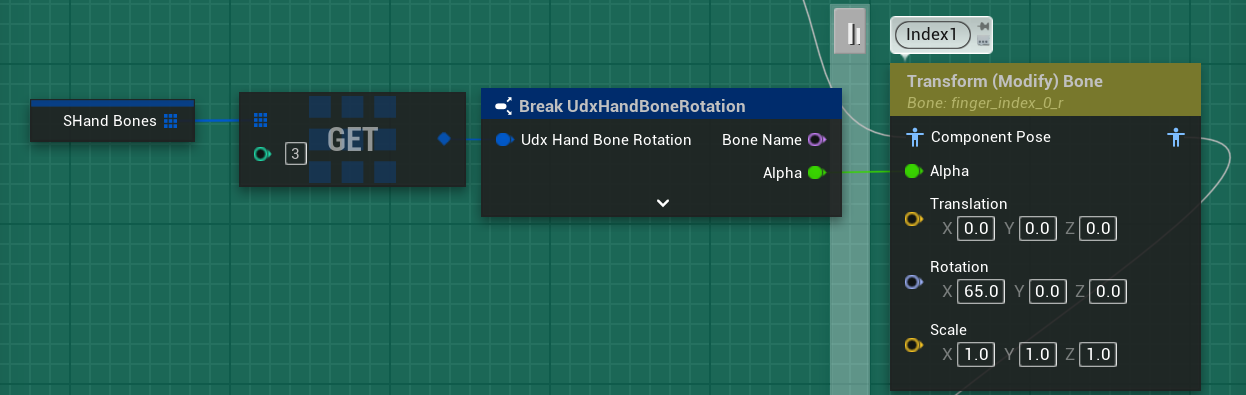
  * **TArray\<UdxHandBoneRotations>** SHandBones

<figure><img src="https://2082502898-files.gitbook.io/~/files/v0/b/gitbook-x-prod.appspot.com/o/spaces%2F8s1Ia6TfFovgyJ5JsDJZ%2Fuploads%2FyK4XfXIaGBPgPPxL3Ihv%2Fimage.png?alt=media&#x26;token=c955c5a0-16b8-4b52-8562-b94339a2386d" alt="" width="425"><figcaption></figcaption></figure>

* Create the following blueprint for each finger joint

<figure><img src="https://2082502898-files.gitbook.io/~/files/v0/b/gitbook-x-prod.appspot.com/o/spaces%2F8s1Ia6TfFovgyJ5JsDJZ%2Fuploads%2FgyyTIvNgL7X8CCMFrCZu%2Fimage.png?alt=media&#x26;token=7b1d276c-a484-4951-b568-cf6e77259166" alt="" width="563"><figcaption></figcaption></figure>

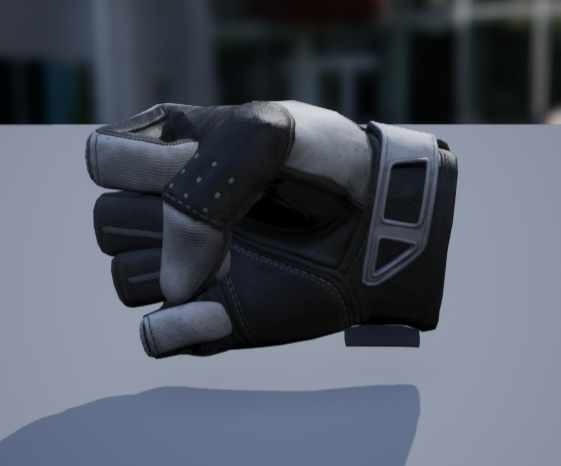
* Adjust the transformation nodes in the animation blueprint, and finally achieve the fist-clenching pose.

<figure><img src="https://2082502898-files.gitbook.io/~/files/v0/b/gitbook-x-prod.appspot.com/o/spaces%2F8s1Ia6TfFovgyJ5JsDJZ%2Fuploads%2FD18504mjEEjjj93jww9X%2Fimage.png?alt=media&#x26;token=a31dc10d-a8d6-4e99-8cd7-e8652f878220" alt="" width="421"><figcaption></figcaption></figure>

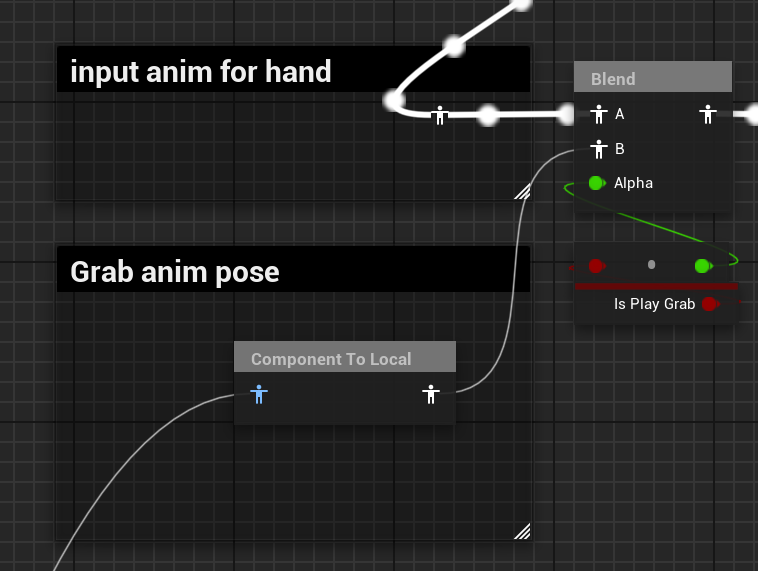
* Add the Blend animation node to switch between the motion capture state and the interaction state.

<figure><img src="https://2082502898-files.gitbook.io/~/files/v0/b/gitbook-x-prod.appspot.com/o/spaces%2F8s1Ia6TfFovgyJ5JsDJZ%2Fuploads%2FKo3pijSMRLo4eOnlqTIg%2Fimage.png?alt=media&#x26;token=cef959be-d736-447f-a58f-0a9f500cfe46" alt="" width="563"><figcaption></figcaption></figure>

#### 3.1.3. Add Grabbing Component

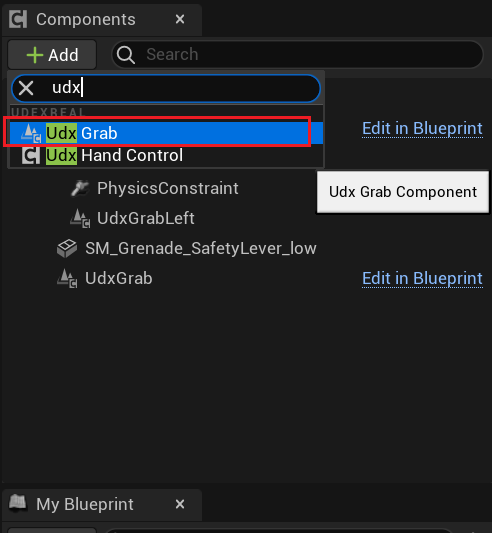
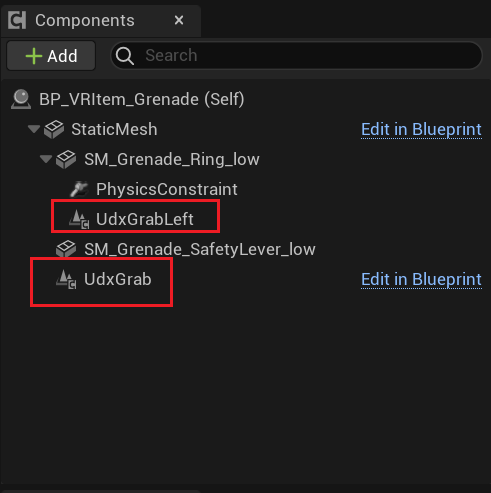
* Add Grab component
  * Add grabbing components to props and use them with interactive components. Add them as needed, and when interacting, recognize grabbing components with the same handType as the interactive component and grab the one closest to the grabbing point.

{% columns %}
{% column %}

<figure><img src="https://2082502898-files.gitbook.io/~/files/v0/b/gitbook-x-prod.appspot.com/o/spaces%2F8s1Ia6TfFovgyJ5JsDJZ%2Fuploads%2F055Tgdb5Ca0aBDkDFcxI%2Fimage.png?alt=media&#x26;token=309510bf-8c66-4f44-9f59-afeb543995cb" alt=""><figcaption></figcaption></figure>
{% endcolumn %}

{% column %}

<figure><img src="https://2082502898-files.gitbook.io/~/files/v0/b/gitbook-x-prod.appspot.com/o/spaces%2F8s1Ia6TfFovgyJ5JsDJZ%2Fuploads%2FeiRyuzpfcC4R8ZeUPz93%2Fimage.png?alt=media&#x26;token=5c9f9db6-e164-46c9-bd85-b15d8dc4820a" alt=""><figcaption></figcaption></figure>
{% endcolumn %}
{% endcolumns %}

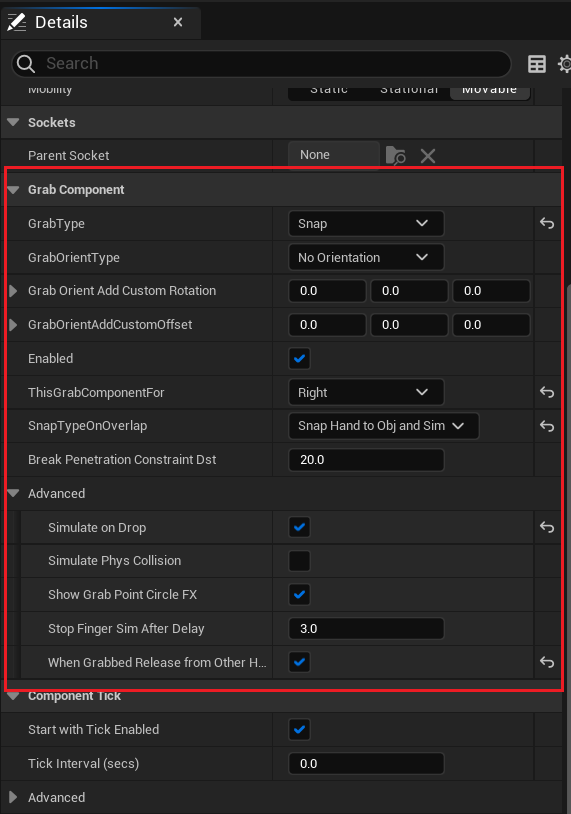
* Grab component settings

<table><thead><tr><th width="259">Name</th><th width="100">Type</th><th>Explain</th></tr></thead><tbody><tr><td>GrabType</td><td>Enum</td><td>The capture type enables the implementation of different capture logic by selecting different types.</td></tr><tr><td>GrabOrientType</td><td>Enum</td><td>Prompt whether to align and grasp the props at the correct positions</td></tr><tr><td>GrabOrientAddCustomRotation</td><td>FRotator</td><td>Add custom rotation offset to the props after interaction</td></tr><tr><td>GrabOrientAddCustomOffset</td><td>FVector</td><td>After interaction, add custom position offsets to the hand model</td></tr><tr><td>Enable</td><td>bool</td><td>Do you want to enable this crawling component</td></tr><tr><td>ThisGrabComponentFor</td><td>Enum</td><td>Which hand should be used to grasp the prop on which this component is hung</td></tr><tr><td>SnapTypeOnOverlap</td><td>Enum</td><td>Decide whether the interactive props are static or can be picked up and moved.</td></tr><tr><td>BreakPenetrationConstraintDst</td><td>float</td><td>Not in use yet</td></tr><tr><td>SimulateOnDrop</td><td>bool</td><td>Enable item physics simulation</td></tr><tr><td>SimulatePhysCollision</td><td>bool</td><td>Enable item physical collision</td></tr><tr><td>ShowGrabPointCircleFX</td><td>bool</td><td>Not in use yet</td></tr><tr><td>StopFingerSimAfterDelay</td><td>bool</td><td>Not in use yet</td></tr><tr><td>WhenGrabbedReleaseFromOtherHands</td><td>bool</td><td>Prevent irreversible situations from occurring when both hands are grasping the same object.</td></tr></tbody></table>

<figure><img src="https://2082502898-files.gitbook.io/~/files/v0/b/gitbook-x-prod.appspot.com/o/spaces%2F8s1Ia6TfFovgyJ5JsDJZ%2Fuploads%2FXqJuE3Y1NteO9AGrp85F%2Fimage.png?alt=media&#x26;token=5d0a42bf-d4ce-49b9-aedb-67f6f0c7420f" alt="" width="428"><figcaption></figcaption></figure>

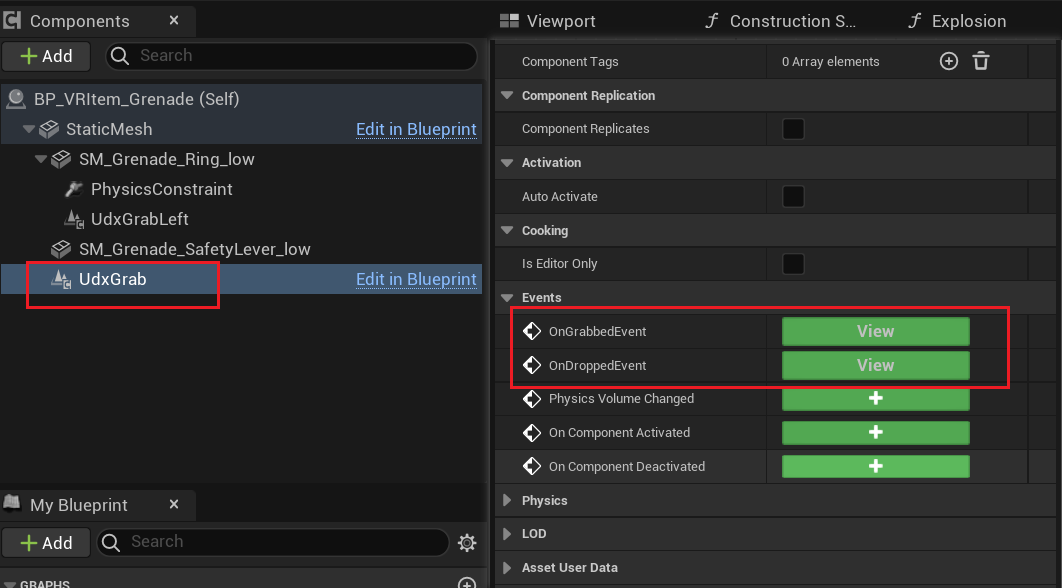
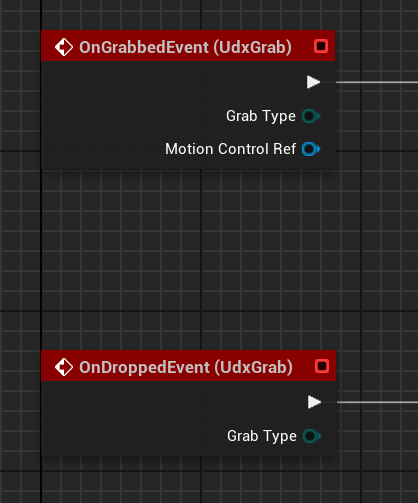
* Add component for grab/release events

{% columns %}
{% column width="66.66666666666666%" %}

<figure><img src="https://2082502898-files.gitbook.io/~/files/v0/b/gitbook-x-prod.appspot.com/o/spaces%2F8s1Ia6TfFovgyJ5JsDJZ%2Fuploads%2FsmQ1JBfANXbL640K859v%2Fimage.png?alt=media&#x26;token=8bc87d38-b5b3-4472-b86b-1aedb9c140a9" alt=""><figcaption></figcaption></figure>
{% endcolumn %}

{% column width="33.33333333333334%" %}

<figure><img src="https://2082502898-files.gitbook.io/~/files/v0/b/gitbook-x-prod.appspot.com/o/spaces%2F8s1Ia6TfFovgyJ5JsDJZ%2Fuploads%2FjAwOO3qMBfO93u25efek%2Fimage.png?alt=media&#x26;token=0db8b093-6a74-4a92-8e93-b43da69504d3" alt=""><figcaption></figcaption></figure>
{% endcolumn %}
{% endcolumns %}

### 3.2. Transfer Parameters to Interactive Components

#### 3.2.1. Initialize Interactive Components

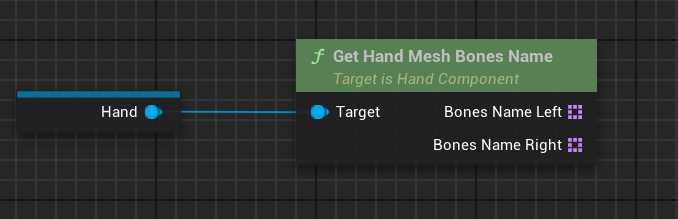
When the event starts running, pass in the grab point and hand bone model (currently only supports hand bones).

<figure><img src="https://2082502898-files.gitbook.io/~/files/v0/b/gitbook-x-prod.appspot.com/o/spaces%2F8s1Ia6TfFovgyJ5JsDJZ%2Fuploads%2FVWEIhhlEfn0tOQfMONio%2Fimage.png?alt=media&#x26;token=b34a6752-f69d-4f10-922d-40b3bc06528a" alt="" width="509"><figcaption></figcaption></figure>

#### 3.2.2. Grab and Release

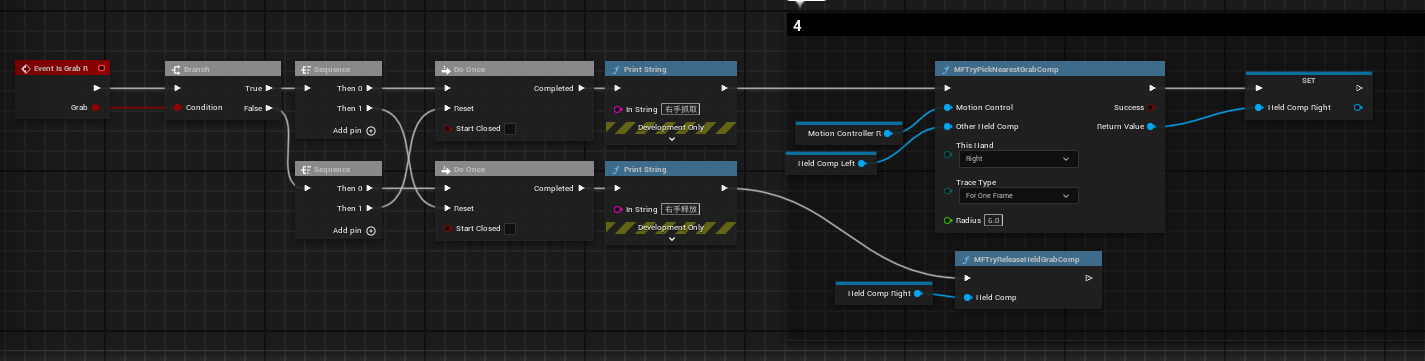
1. **PC Development**

<figure><img src="https://2082502898-files.gitbook.io/~/files/v0/b/gitbook-x-prod.appspot.com/o/spaces%2F8s1Ia6TfFovgyJ5JsDJZ%2Fuploads%2FmXZrHRBmyR5atCqD2Nec%2Fimage.png?alt=media&#x26;token=a1a0baca-53ad-4cff-948f-4bb2f06eea26" alt="" width="563"><figcaption></figcaption></figure>

2. **Android Development**

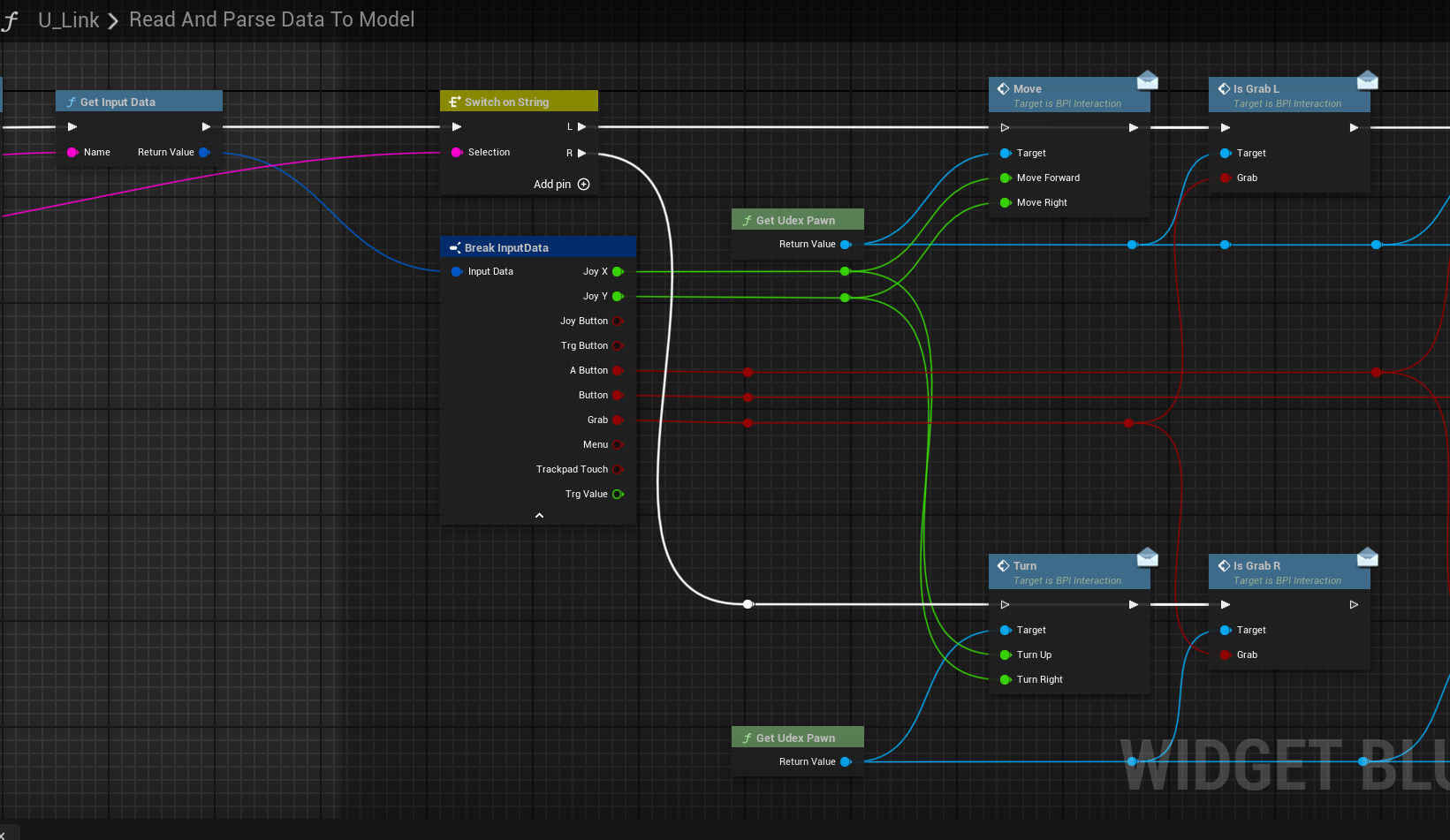
Implement capture and release through event triggering in Android SDK.    Note: The blueprint interface in the illustration needs to be created by yourself and then called at the grip event trigger of the Android SDK or using the PC development method.

<figure><img src="https://2082502898-files.gitbook.io/~/files/v0/b/gitbook-x-prod.appspot.com/o/spaces%2F8s1Ia6TfFovgyJ5JsDJZ%2Fuploads%2FI9MKPbZnkyEpV32z3dA7%2Fimage.png?alt=media&#x26;token=90b450df-b514-4f47-a894-5079fffc387b" alt="" width="563"><figcaption></figcaption></figure>

3. **Android Development Requires the Use of Interface Calls.**

<figure><img src="https://2082502898-files.gitbook.io/~/files/v0/b/gitbook-x-prod.appspot.com/o/spaces%2F8s1Ia6TfFovgyJ5JsDJZ%2Fuploads%2FjBXfHkIOSIzsv2esqZW5%2Fimage.png?alt=media&#x26;token=b81a8d29-e116-4535-a70c-4cdb247d3b63" alt="" width="563"><figcaption></figcaption></figure>

## 4. Example of Interactive Usage

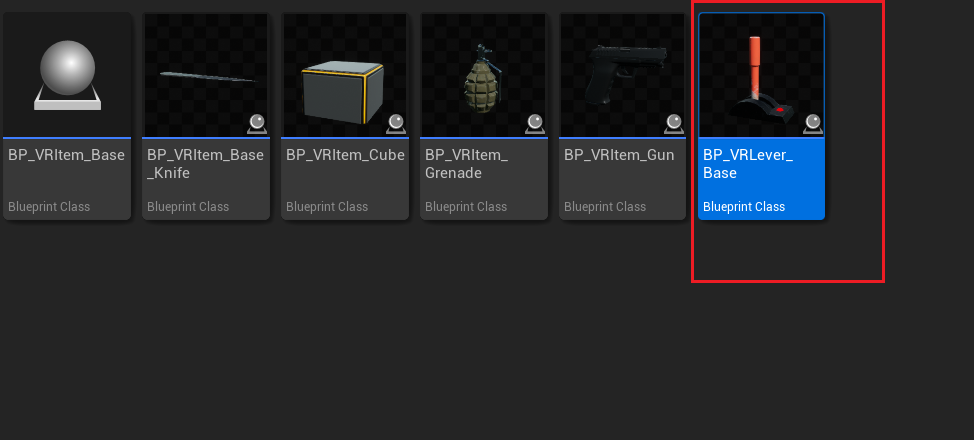
### 4.1. Interaction Cannot Move Objects (such as doors, levers). Let's take the lever as an example.

1. Create a blueprint with the base class set as "Actor"

<figure><img src="https://2082502898-files.gitbook.io/~/files/v0/b/gitbook-x-prod.appspot.com/o/spaces%2F8s1Ia6TfFovgyJ5JsDJZ%2Fuploads%2FaU6vwCtpsxnGT5cSpt3W%2Fimage.png?alt=media&#x26;token=23f64e68-33aa-42f7-8f9e-2b3ec11bbafb" alt="" width="563"><figcaption></figcaption></figure>

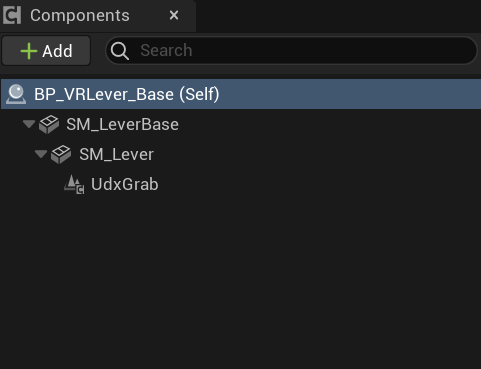
2. The component with a push rod added

<figure><img src="https://2082502898-files.gitbook.io/~/files/v0/b/gitbook-x-prod.appspot.com/o/spaces%2F8s1Ia6TfFovgyJ5JsDJZ%2Fuploads%2FL4sXWi1KnuP6MpKqGTUx%2Fimage.png?alt=media&#x26;token=991aeb96-25c0-480e-80b8-5bc5f512ee60" alt="" width="361"><figcaption></figcaption></figure>

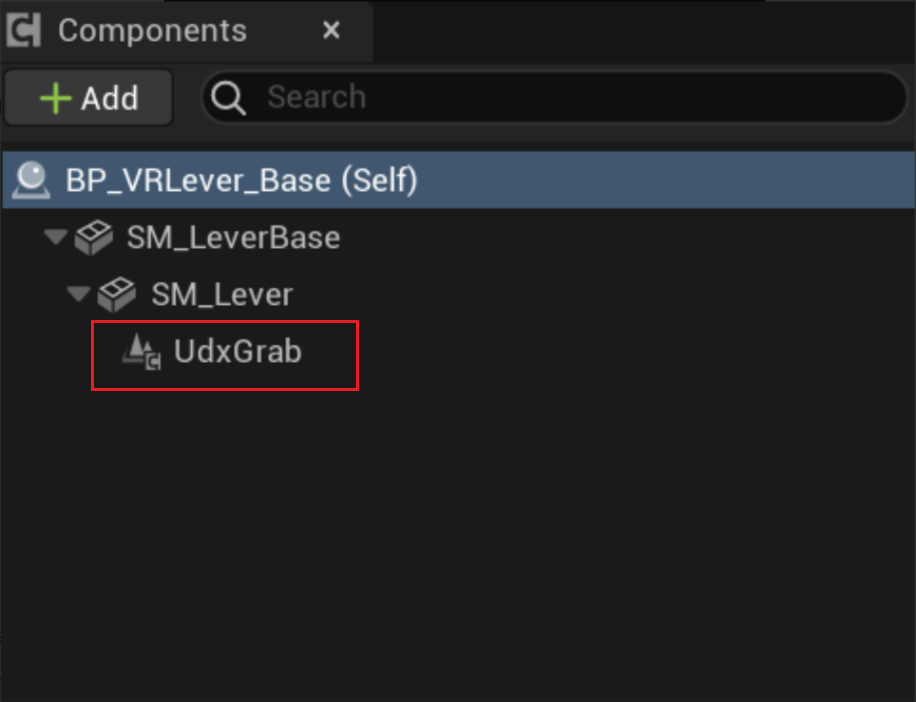
3. Add the grasping component (⚠️The grasping component should be placed under the part that needs to have its transformation modified. For example, if the rod of the push rod needs to rotate, place it under the part).

<figure><img src="https://2082502898-files.gitbook.io/~/files/v0/b/gitbook-x-prod.appspot.com/o/spaces%2F8s1Ia6TfFovgyJ5JsDJZ%2Fuploads%2FKYpny3Vr3WUfs39l4u6J%2Fimage.png?alt=media&#x26;token=dd366e3b-e5f2-4444-b397-f8ebe08b7454" alt="" width="563"><figcaption></figcaption></figure>

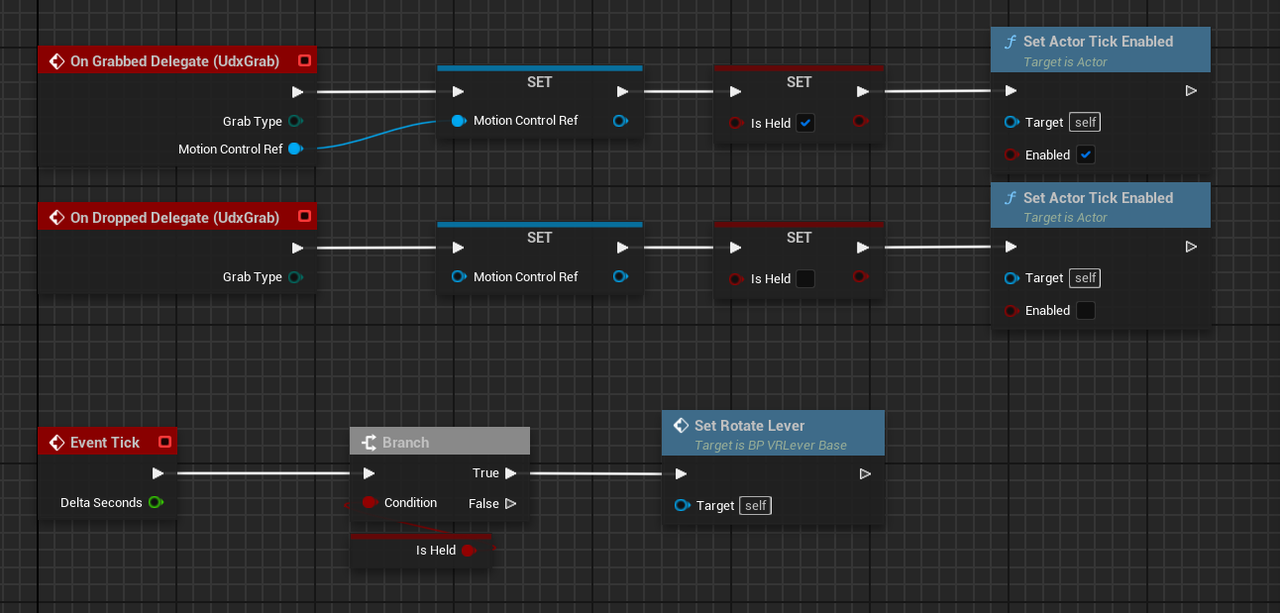
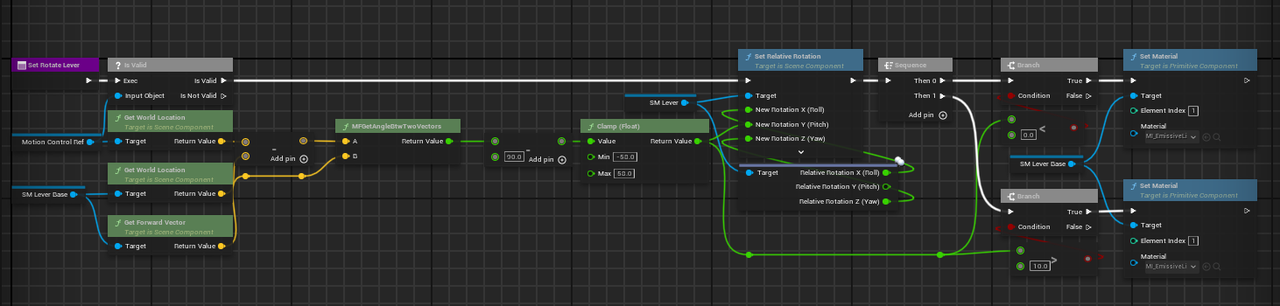
4. Write the logic for the rotation of the push rod

**Note:** This logic does not involve optimization. It merely provides a tutorial on how to use this plugin and the approach for creating such objects. Please understand.

<figure><img src="https://2082502898-files.gitbook.io/~/files/v0/b/gitbook-x-prod.appspot.com/o/spaces%2F8s1Ia6TfFovgyJ5JsDJZ%2Fuploads%2FYH5U4w2HGXZayeOrqgSx%2Fimage.png?alt=media&#x26;token=d098af68-a781-47d6-ac6a-ef072364bed3" alt="" width="563"><figcaption></figcaption></figure>

<figure><img src="https://2082502898-files.gitbook.io/~/files/v0/b/gitbook-x-prod.appspot.com/o/spaces%2F8s1Ia6TfFovgyJ5JsDJZ%2Fuploads%2FjfvjoBjkZyLT5XNHTJW7%2Fimage.png?alt=media&#x26;token=e1680d7f-0909-4ca7-ab72-4e6fb0b0c892" alt="" width="563"><figcaption></figcaption></figure>

## 5. Demo Video Display (temporary)

To be added...